
Macros for Counter-Strike 2
Our macros for Counter-Strike 2 are calculated with perfect accuracy and will not leave you indifferent, no matter what macros you have used before. The new proscripts algorithm version 1.3 made it possible to make all macros as accurate as possible throughout the spray from the first to the last shot.
You can buy and download our professional "PRO" macros only:
If for some reason one of the sites does not work or payment methods do not work, then the other will certainly work. Updates and support are provided at both sites.
Full list of macros:
A complete list of macros for CS2 weapons looks like this: AK47, SG553, GALIL, M4A4, M4A1-S, AUG, FAMAS, MP5-SD, MP7, MP9, PP-19 BIZON, MAC-10, P90, UMP-45, M249, NEGEV, AWP/SSG (Logitech G Pack MAX), AUTO CLICKER (Logitech G Pack MAX).
Macros are combined into packs and, depending on the format, packs can be arranged in different ways, some macros may be available only for certain mice and formats.
CS2 settings for macros

All other settings that affect mouse sensitivity should be set to default, including m_yaw and m_pitch.

Macro format
A4Tech Bloody and X7 (Bloody 7, Bloody Esports, Oscar)
For A4Tech mice, the *.amc format is universal and allows you to easily load our macros into an A4Tech X7 mouse through the Oscar program or into an A4Tech Bloody mouse through the Bloody 7 program.
Most macros are equipped with LMB versions (LKM in the macro name) for A4Tech X7 mice, which can be loaded on the mouse button 7 and by clicking on it turn them on/off while holding the left mouse button.
Logitech G (G HUB)
Now you have the opportunity to try our best CS2 macros in *.lua format for Logitech G HUB which work perfectly on any version of Windows!
G Pack macros
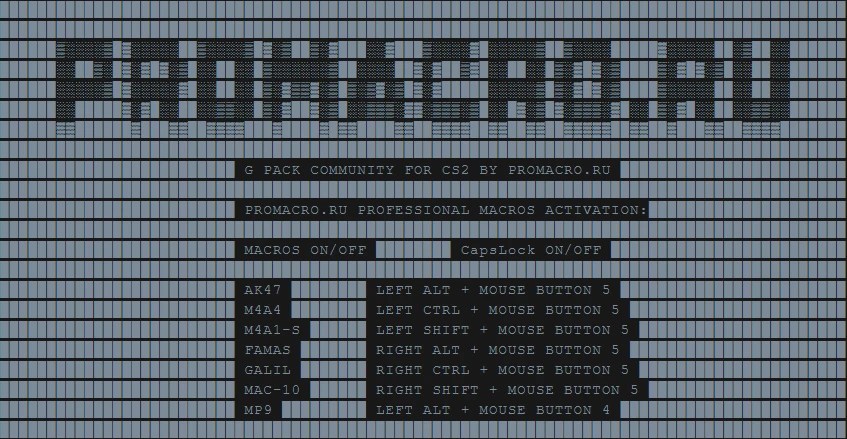
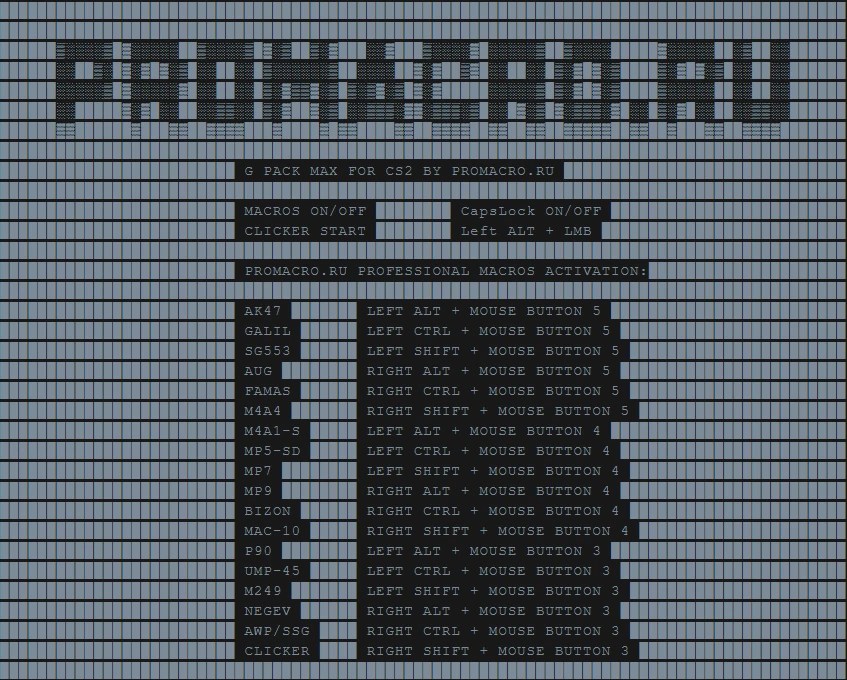
G Pack, unlike simple packs where there is one macro file per weapon, is a macro program loaded into the Logitech G HUB which, depending on the version, can contain up to 18 macros! The proprietary macro switching system in G Pack works flawlessly and allows you to switch between macros on the fly through keyboard and mouse shortcuts!
At the moment, our G Pack format is the best macro option for Logitech G mice.
Managing G Pack Features
Each G Pack of the latest version includes a detailed table of macro and function switching. You can use it directly from the G HUB script window or simply download it as an image.
Premium versions of Logitech macros
Premium versions of Logitech macros for CS2 differ in their operating algorithms and due to this, in addition to fast response and overall high speed of operation, they have additional functionality.
Supports Logitech G-button keyboards
If you have a Logitech keyboard with G buttons supported by the Logitech G HUB software, you can reassign any macro combinations to these buttons, i.e. you have the additional ability to assign up to 12 shortcuts to the G buttons (F1 to F12) of your keyboard.

In this example, AK47 is activated when the G3 (F3) button is pressed, M4A4 is activated when the G4 (F4) button is pressed, and so on. All buttons whose values are zero are still activated through standard combinations.
You can change the values of G buttons through any text editor (don’t forget to save the changes), or directly in the G HUB script window (you need to restart the script after any changes).
When you assign a G button, the default combo for that weapon will stop working until you reset it to zero.
Automatic return of the sight after running the macro
Compensation for sight shift using macros after any shot with the additional ability to adjust the speed of this shift.

Enabling and disabling the return function is tied to the state of the Scroll Lock button, and through the values of the rSpeed variable (greater than zero), you can adjust the speed of the return itself.
Macro activation mode only in squat
Shooting from a crouched position in CS2 has the least randomness, and therefore the highest efficiency, so in these macros you can activate a function in which the macros will only work in a sitting position (pressing and holding left CTRL is monitored).

To do this, you need to change the value of the OFF_ON_CTRL_MODE variable from false to true

You probably noticed the COMPENSATION_ONLY_CTRL variable, as the name suggests, activating it in the same way as the OFF_ON_CTRL_MODE variable will enable the mode of automatic compensation of displacement from running macros only in squat mode.
Inversion macros mode
If you play with mouse inversion, then you can also use all the functionality of macros without any problems. To activate the inversion mode, just set the value of the parameter INVERSION = true.

Razer (Synapse 3)
Our RAZER mouse macros in *.xml format are suitable for all mice running Razer Synapse 3 software. If you have any other CS2 macros in Razer mouse format before… feel the difference as they say 🙂
DPI and overall mouse sensitivity
If the mouse sensitivity seems too high or too low for you, you can increase or decrease the DPI on the mouse itself, this will not affect the macros in any way.
Free and useful macros for your start
Decided to try macros for the first time? Then be sure to use our free macros for CS2 or even good old CS 1.6 in formats for Logitech mice (G HUB or LGS), A4Tech Bloody, X7 and Razer (Synapse 3). Macros for Logitech G are activated by enabling CapsLock. Playback option for Razer macros – “Play while assigned key is pressed“.
Features of using and installing free macros
- Universal macros for Logitech G mice will be enabled/disabled via CapsLock.
- Razer Universal Mouse Macros work with the Play When Assigned Key Pressed playback options.
How useful was this post?
Click on a star to rate it!
Average rating / 5. Vote count:
No votes so far! Be the first to rate this post.